
MyInn

Product

Built around the problems that keep innkeepers up at night.

Double books. Late-night door codes. Listing sites that take a cut. Cleaning chaos before the next arrival. Here is how MyInn helps with each one — with the screens your team will actually use.

Stops the double-book panic · 01

See the whole week without opening five tabs

When Airbnb, your website, and a phone reservation all book the same night, someone loses. MyInn keeps every stay on one calendar so you spot the clash before the guest arrives.

Stretch a stay, move someone to another room, or block a night for repairs — and MyInn warns you if that night is already taken. You are not updating a spreadsheet after the fact.

A quick look tells you who is arriving, who has paid, and which rooms still need attention. That is the morning question every innkeeper asks.

  • · One place for every booking, every room, every night
  • · Warns you before two guests claim the same bed
  • · Shows who paid and who still owes
  • · Block rooms for cleaning, owners, or maintenance
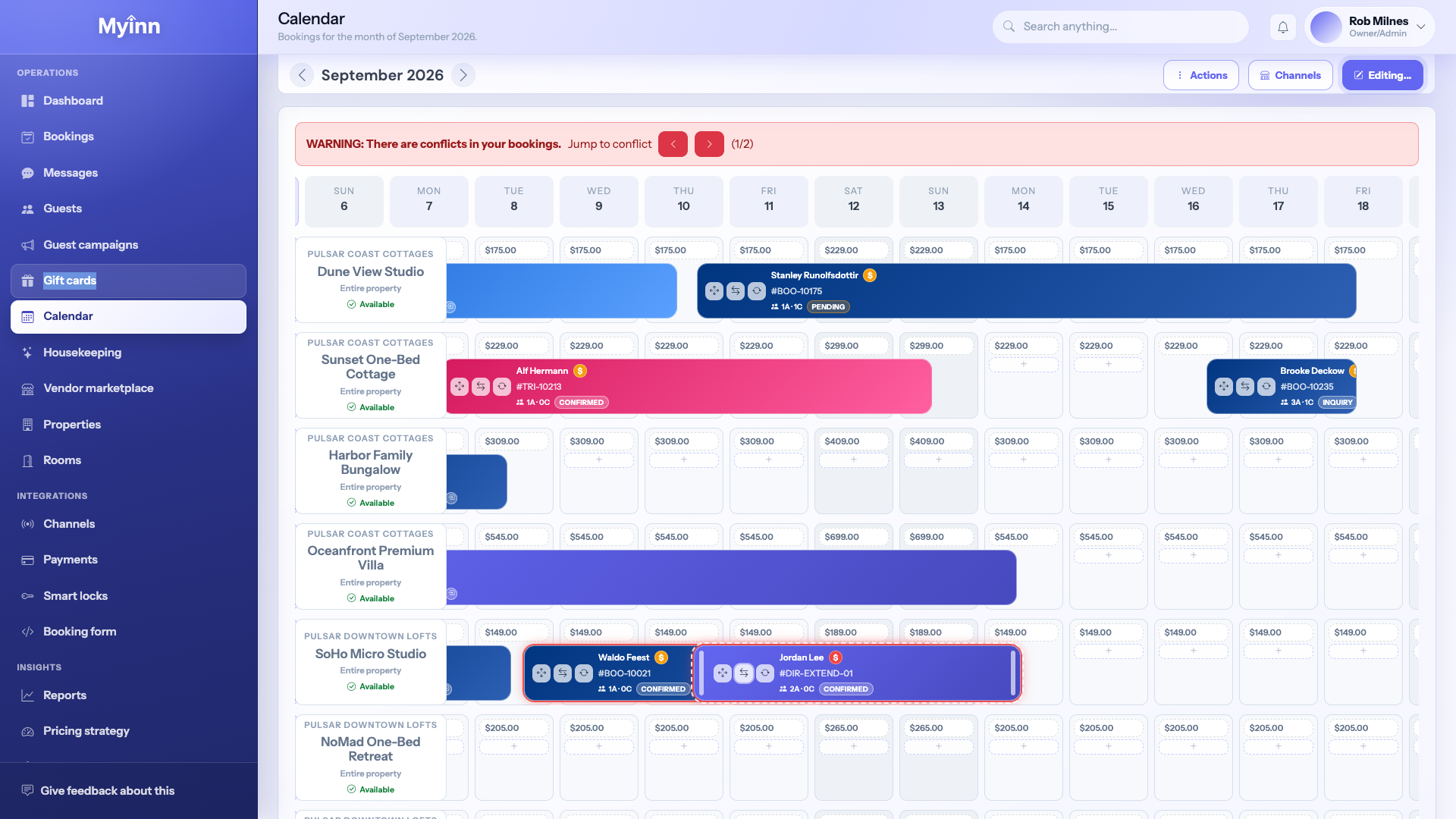
MyInn calendar showing bookings across rooms and nights

Stops overselling · 02

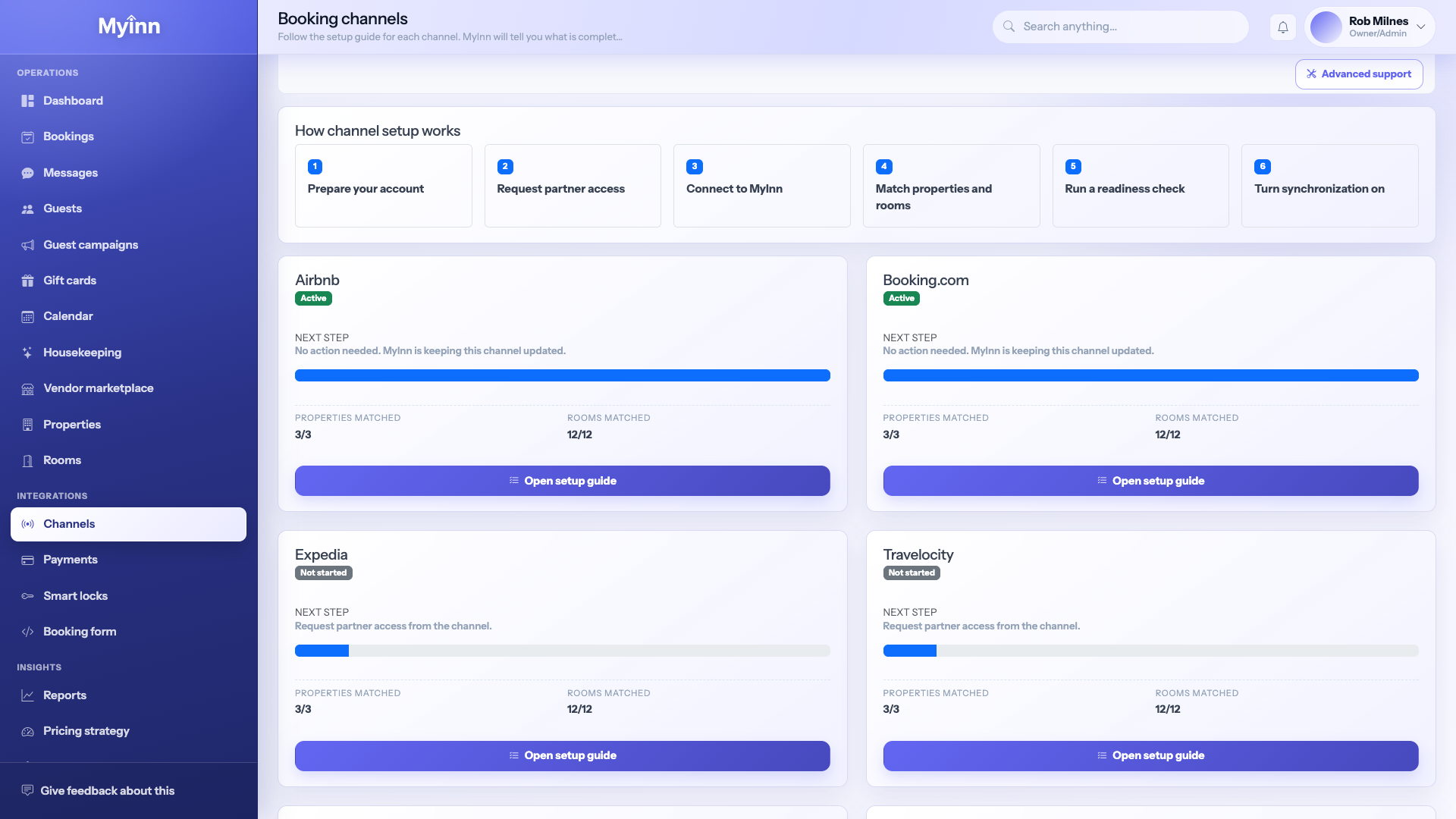
List on Airbnb and Booking.com without fighting yourself

Most operators live in fear that a room sold on one site is still showing open on another. MyInn updates your availability across the big listing sites when a night sells — so you are not the one apologizing at the door.

Connect Airbnb, Booking.com, Expedia, VRBO, and the others once. New bookings from those sites land on your calendar automatically.

When you change a rate or close a night, those sites get the update. You stop playing traffic controller between apps that do not talk to each other.

  • · Works with the listing sites guests already use
  • · New bookings show up on your calendar — not in a forgotten email
  • · Sold-out nights stop appearing open elsewhere
  • · Setup walks you through matching rooms before you go live
MyInn channel connections including Airbnb and Booking.com

Stops the inbox scramble · 03

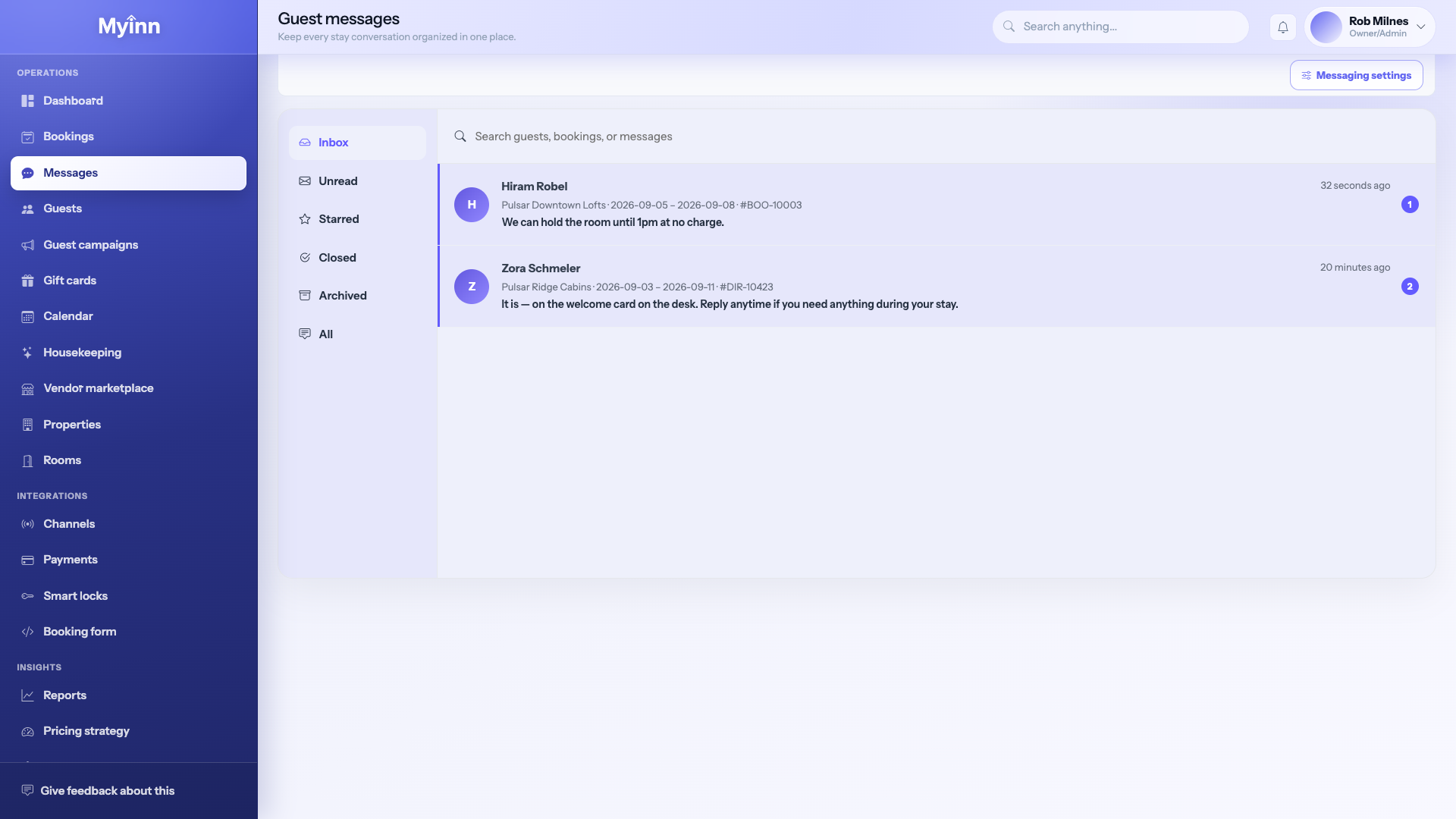
Answer guests without hunting for which stay they mean

Guests message from everywhere. You should not have to dig through email, Airbnb, and texts to remember who is checking in Friday.

MyInn puts the conversation next to the booking — names, dates, and room — so your reply is right the first time. Your helper at home or at the front desk sees the same thread.

  • · One inbox instead of five half-finished chats
  • · Dates and room sit beside the message while you type
  • · Anyone on your team can pick up without starting over
MyInn guest message inbox with the stay details beside the conversation

Stops late-night lockouts · 04

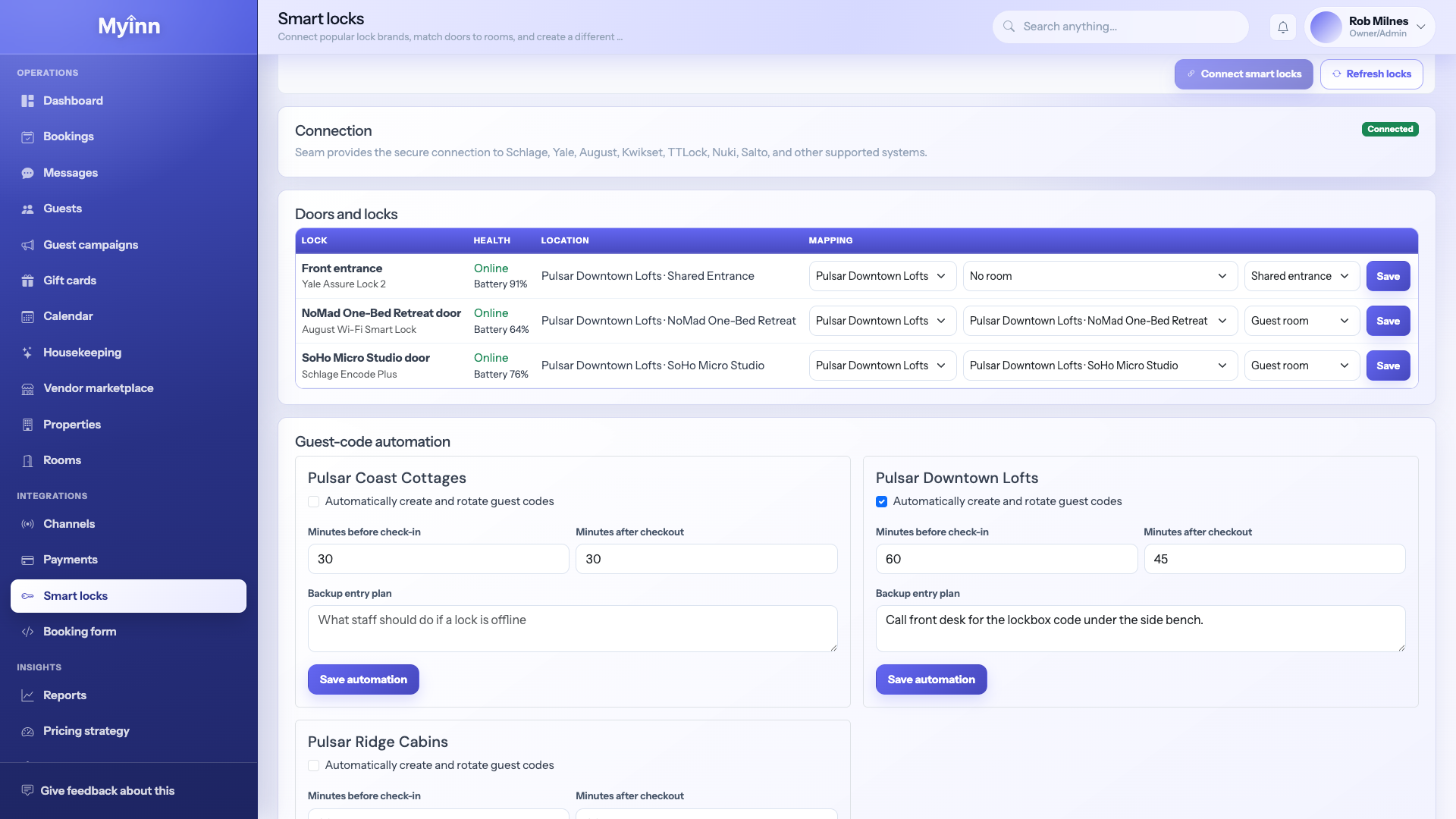
Stop texting the door code at midnight

Guests arrive late. Codes get forwarded to friends. Old codes never die. MyInn ties the door code to the stay — it works when they check in, and it stops working when they leave.

Connect your smart locks, assign them to rooms, and let the booking create the code. You can still see battery warnings before a lock dies on a Friday night.

  • · Fresh code for each stay — not one shared PIN forever
  • · Codes turn on for check-in and off after checkout
  • · Works with popular locks like Yale, August, and Schlage
MyInn smart lock screen with guest door codes

Stops giving away commission · 05

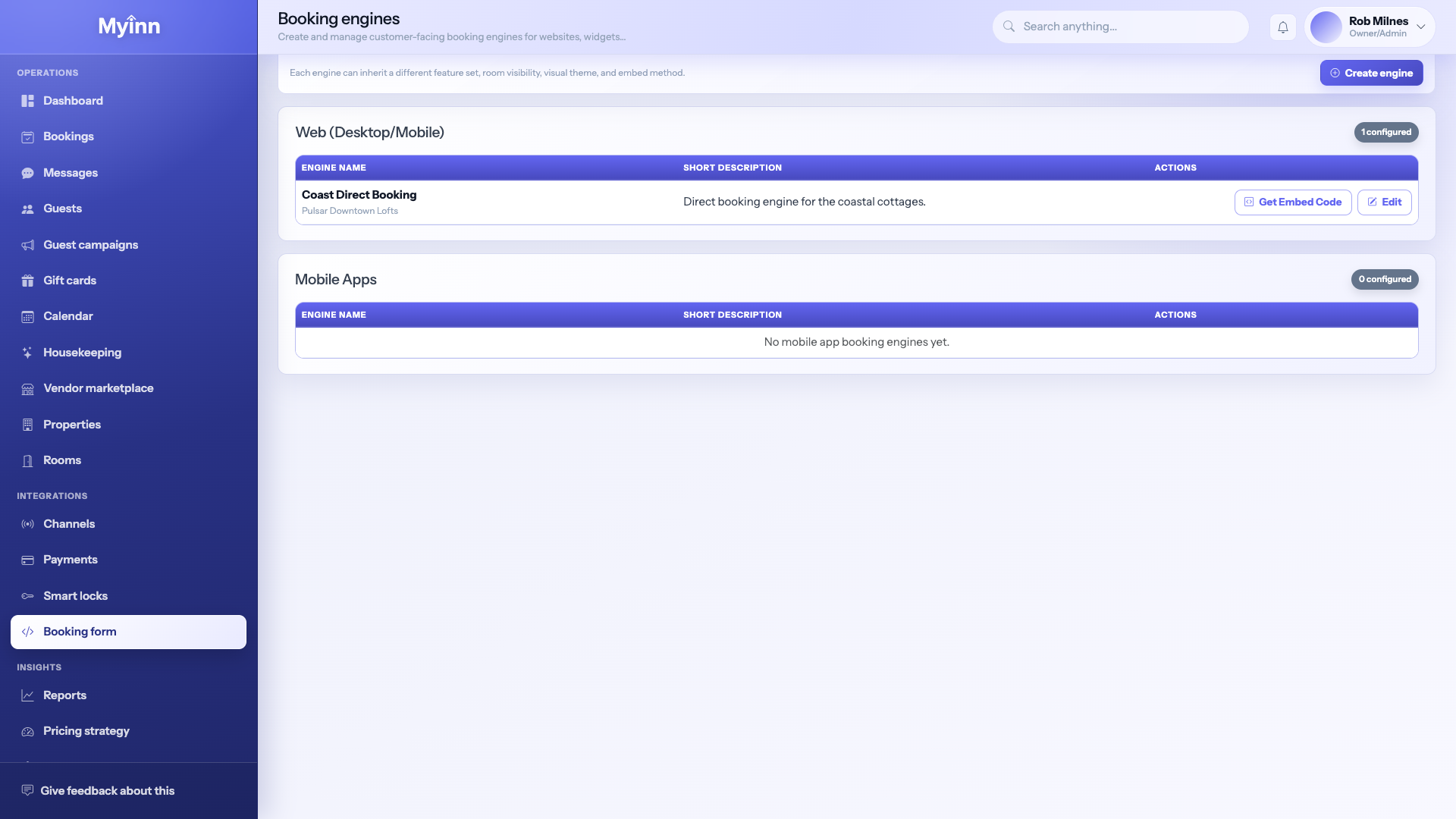
Let guests book on your website — and keep the fee

Every booking that comes through a listing site costs you a cut. MyInn gives you a booking page for your own website so regulars and searchers can reserve with you directly.

Guests pick dates, see the real total (taxes and fees included), and pay online. It feels as clear as the big sites — without teaching people to shop somewhere else first.

You choose whether they book a room, the whole place, or both. Promo codes and house rules are built in, not taped to the fridge.

  • · Put a “Book now” page on the website you already own
  • · Guests see the full price before they pay — no surprises
  • · Takes common cards and payment apps guests already trust
  • · You keep the booking instead of paying a middleman
MyInn list of direct booking pages for your website

Stops the “is it clean?” text chain · 06

Know which rooms are actually ready for the next guest

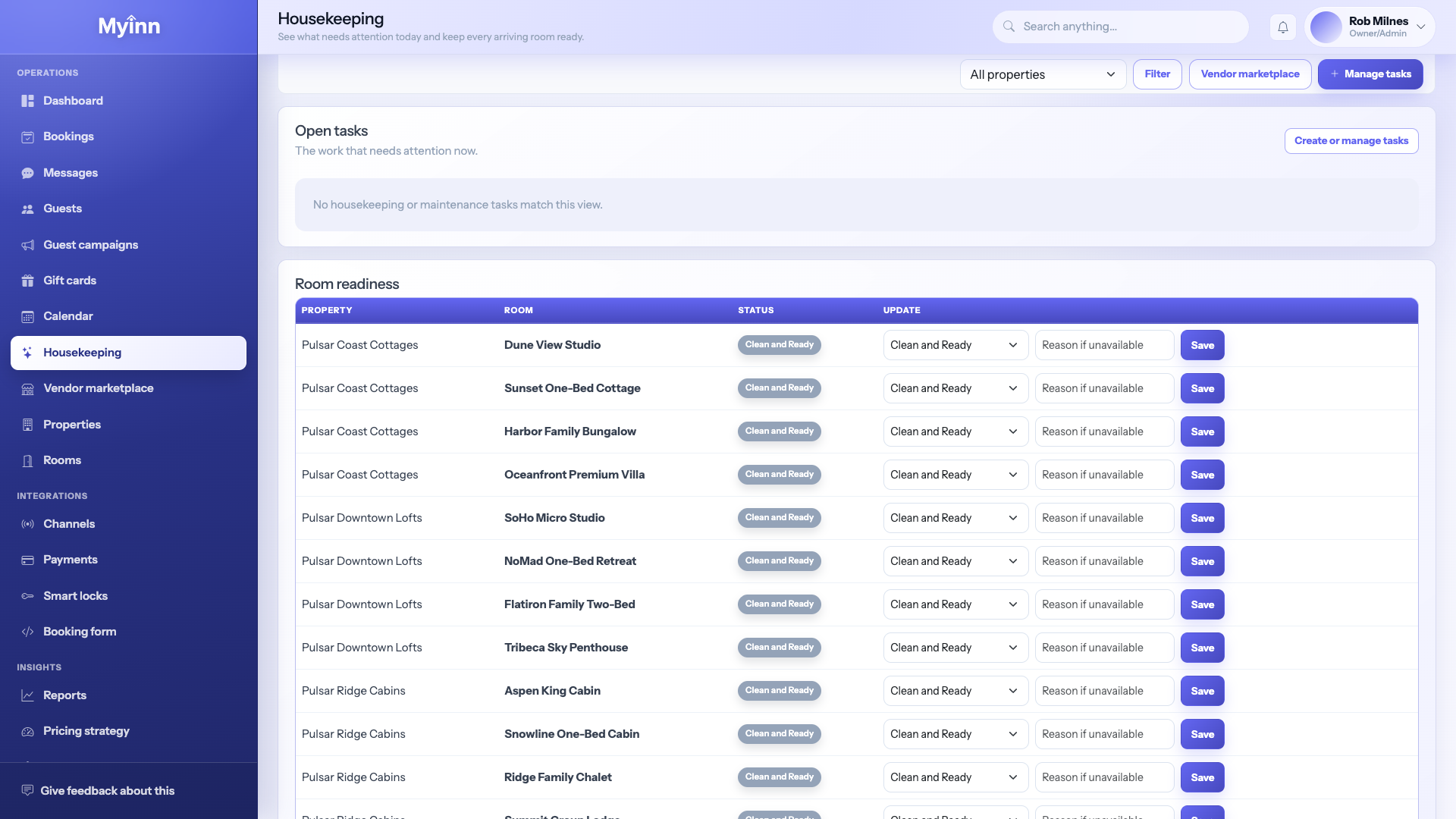
Checkout happens. Someone needs to clean. The next guest is already on the road. MyInn turns that scramble into a clear list of what is dirty, what is in progress, and what is guest-ready.

Your cleaners — whether staff or a local company — see the same board. You can find and invite nearby help, share what they need, and approve them before they walk in.

Tips and thank-yous can go to the people who turned the room, not into a group chat that loses the address.

  • · See dirty → cleaning → ready without calling anyone
  • · Invite a cleaning company and keep them in the loop
  • · Notes about damage or missing supplies stay with the room
  • · Less guessing when back-to-back stays pile up
MyInn housekeeping board showing which rooms need cleaning

Stops leaving holiday money on the table · 07

Sell a stay as a gift — before anyone picks dates

People love giving a weekend away. If you do not sell gift cards, that money goes to a big travel site. MyInn helps you offer cards that bring guests back to you.

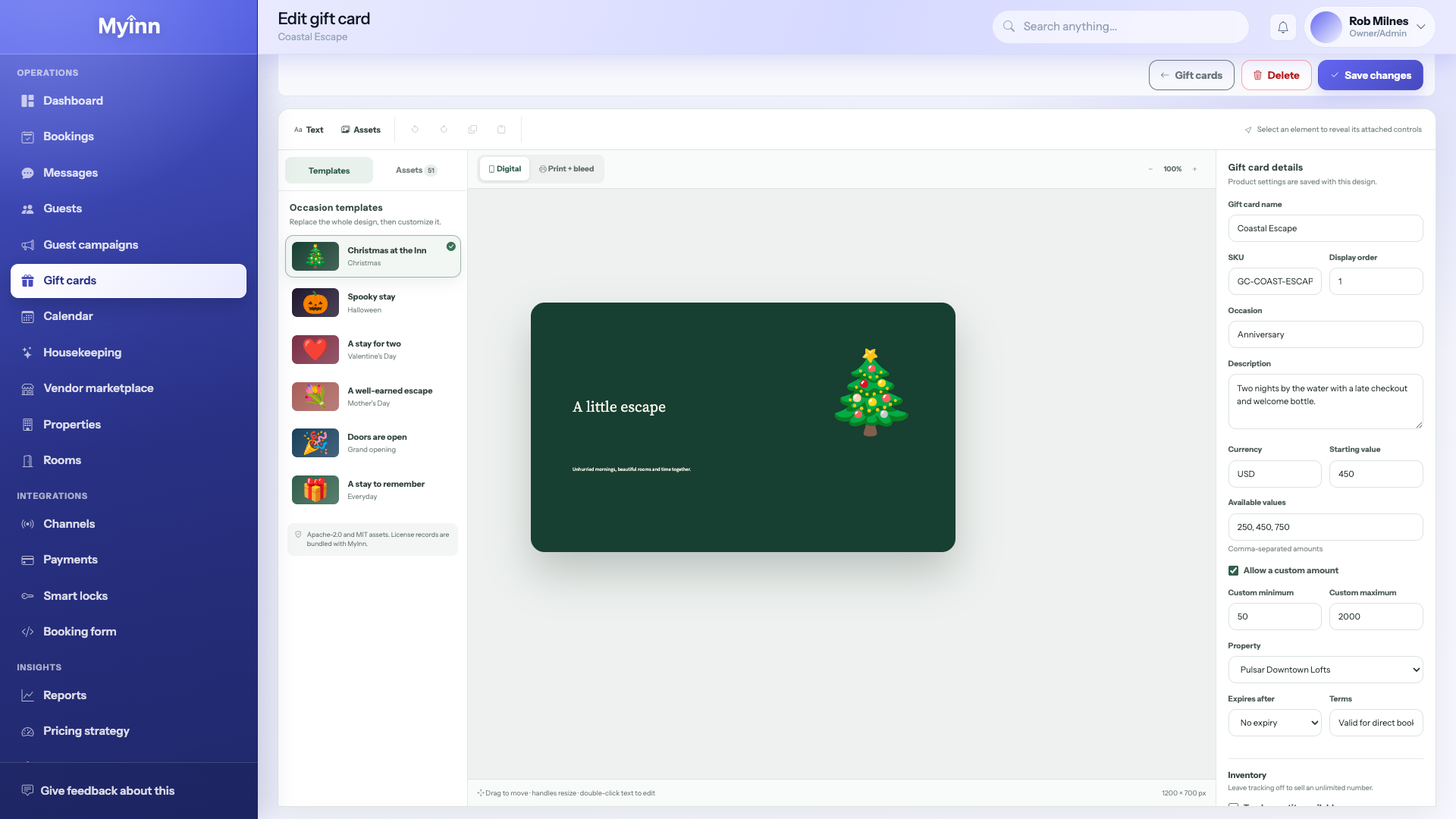
Pick a design for birthdays, holidays, or anniversaries and point buyers to purchase from you. When they redeem, the relationship stays with your property.

  • · Ready-made looks for common occasions
  • · Guests buy from you — not a coupon marketplace
  • · Pairs with the booking page on your website
MyInn gift card designs for holidays and occasions

Stops undercharging the weekends · 08

Raise busy nights and protect slow ones — without guessing every morning

Some weekends should cost more. Some midweeks need a nudge. MyInn helps you set a plan for those nights so you are not hand-editing every listing at 6 a.m.

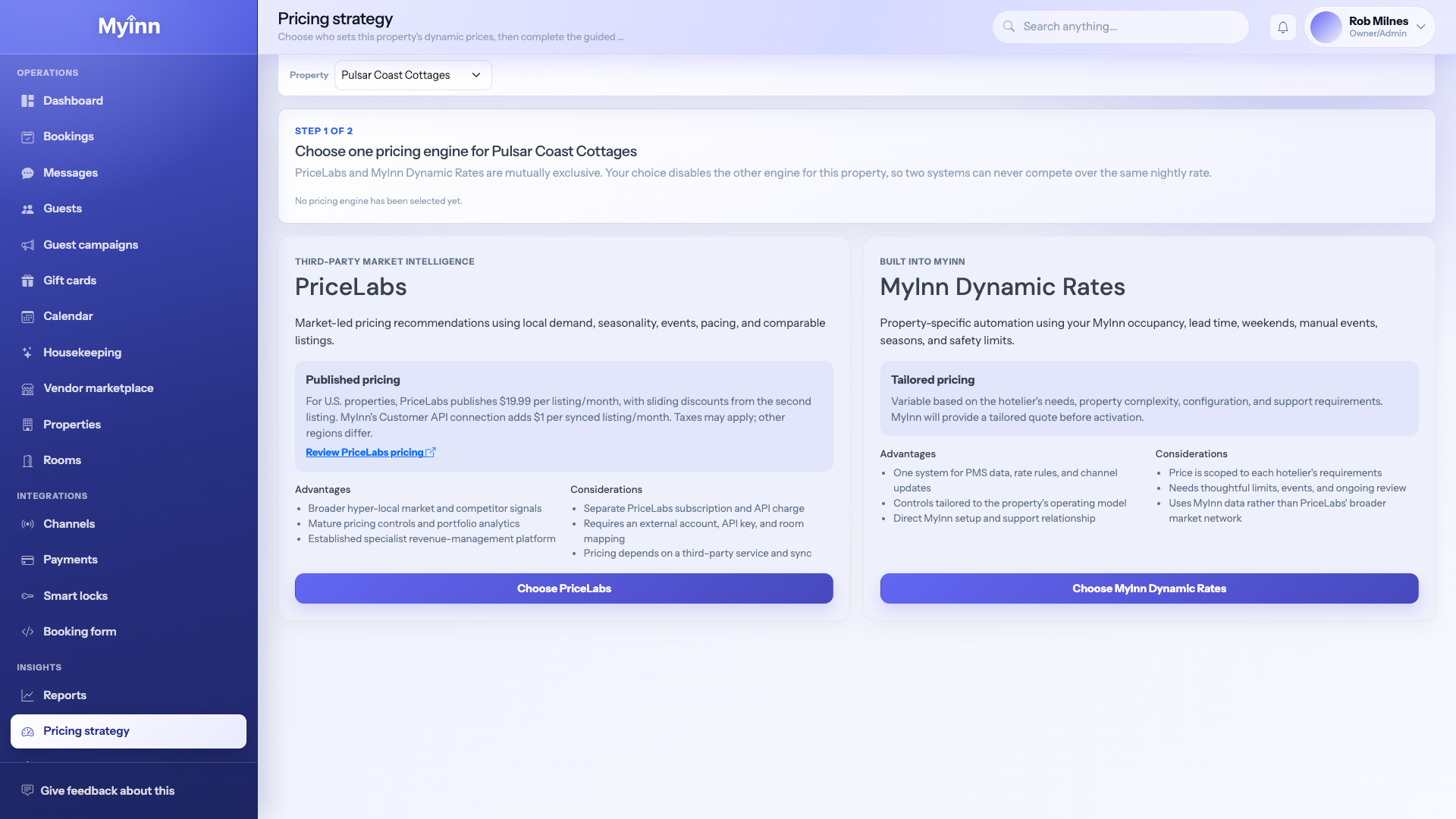
Pick one approach per property — MyInn’s own rate tools, or PriceLabs if you already like that — so two systems are not arguing over the same night.

You can still override a night on the calendar when a wedding weekend or a rainy week needs a human decision.

  • · Plan higher rates for busy nights and events
  • · One pricing approach per property — no fighting tools
  • · Change a single night by hand whenever you need to
MyInn pricing controls for busy and slow nights

Stops Sunday-night Excel · 09

Answer “how did we do?” without rebuilding a spreadsheet

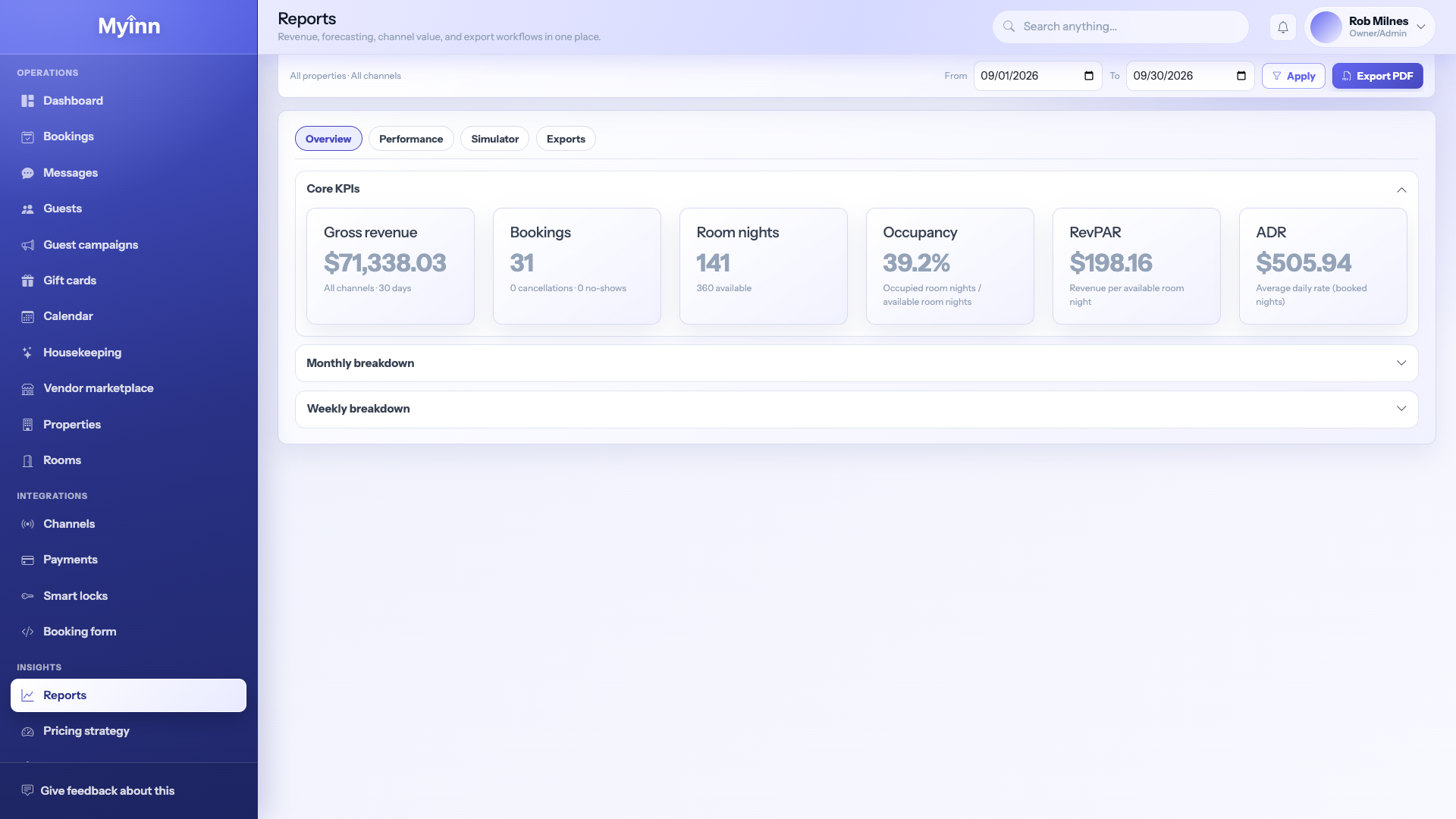
Owners, partners, and accountants ask the same questions: how full were we, what did we take in, what went to tax. MyInn answers from the bookings you already ran — not a second set of books.

Pull a week or a month, filter by property or listing site, and export when someone needs a file. Soft months are easier to explain when you can see whether demand dipped — or a listing stopped updating.

  • · Occupancy and revenue without rebuilding sheets
  • · Tax-friendly summaries for the people who need them
  • · Compare listing sites so you know what actually pays
MyInn reports showing how the property is performing

Set it once

Your prices, taxes, fees, and house rules — applied everywhere guests book.

Weekday vs weekend rates, how many nights someone must stay, cleaning fees, lodging tax, and the rules guests agree to before paying. Change them in one place and your calendar, listing sites, and website booking page all follow — so you are not updating the same rule three times.

Make it real

Ready to run the inn from one place?

Account setup typically lands in 24–36 hours with Pulsar CLT support.